
When it comes to protecting your home without breaking the bank, Eufy security cameras have carved out a significant niche in the crowded smart home market. This comprehensive eufy security camera review explores whether these affordable devices deliver the performance, reliability, and features that homeowners need in 2025.
This post is a taste of the honest heavy hitting technology reviews of Monro Cloud.
Understanding Eufy’s Place in Home Security
Eufy, a subsidiary of Anker Innovations, has built its reputation on delivering quality home security products at accessible price points. Unlike premium competitors that require hefty upfront investments and ongoing subscription fees, Eufy takes a different approach by offering local storage options and AI-powered features without mandatory monthly costs. This philosophy has made Eufy cameras particularly attractive to budget-conscious consumers and privacy advocates who prefer keeping their footage stored locally rather than in the cloud.
The brand’s commitment to “no monthly fees” has been a cornerstone of its marketing, though the landscape has evolved somewhat with the introduction of optional cloud storage plans. Still, Eufy maintains its core promise that users can access essential features without recurring subscriptions, setting it apart from competitors like Ring, Nest, and Arlo.
See the Reolink Security Camera Review and Ring Security Camera Review for great comparisons.
Breaking Down the Eufy Camera Lineup
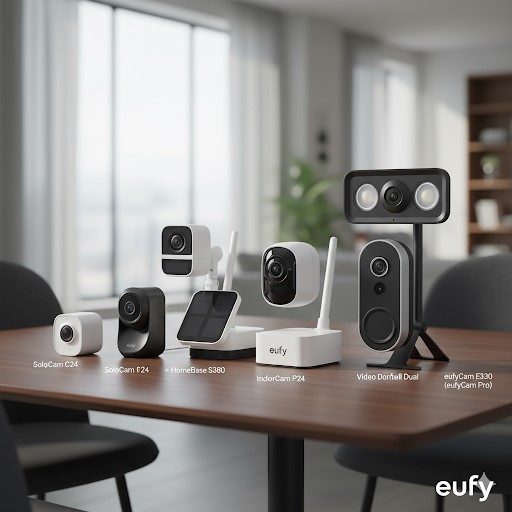
Understanding which Eufy camera suits your needs requires navigating the company’s diverse product lineup. Rather than overwhelming you with technical specifications, let’s examine the most relevant models for different use cases.
Outdoor Cameras: Weather-Resistant Protection
The eufyCam series represents the brand’s outdoor camera offerings, with the eufyCam S300 and eufyCam 3 standing as flagship models. The eufyCam S300 delivers 4K Ultra HD resolution with an impressive 180-day battery life and includes a substantial 1TB hard drive for extensive footage storage. This model exemplifies Eufy’s approach to eliminating subscription dependency by providing generous local storage right out of the box.
The eufyCam 3 offers similar 4K resolution with advanced facial recognition technology and a built-in solar panel that extends battery life indefinitely in suitable conditions. This solar integration means you can truly set it and forget it, avoiding the hassle of regular battery changes that plague many wireless security cameras.
For locations without Wi-Fi coverage, the eufy 4G LTE Cam S330 provides cellular connectivity with 4K colored video and advanced night vision capabilities. This camera captures essential details like faces, vehicles, and license plates even in poorly lit conditions, making it ideal for remote properties, construction sites, or areas where traditional Wi-Fi installation isn’t feasible.
The more budget-friendly eufyCam 2C and eufyCam E models offer 2K resolution and maintain the core benefits of wireless installation and local storage. While lacking the flagship models’ 4K clarity and advanced AI features, these cameras still deliver solid performance for everyday home security needs at a significantly lower price point.
Indoor Cameras: Keeping Watch Inside
For interior monitoring, the Indoor Cam C220 represents excellent value in the 2025 market. Priced under $35, this camera offers crisp 2K resolution with on-device AI for person and pet detection, along with responsive mobile alerts. It’s become a go-to recommendation for those seeking budget-friendly indoor surveillance without compromising essential features.
Eufy’s indoor cameras support expandable storage up to 16TB, ensuring you never run out of space for recordings. This massive storage capacity far exceeds what most households will ever need, but it demonstrates Eufy’s commitment to local storage as a privacy-focused alternative to cloud services.
Specialized Options: Floodlights and Doorbells
Beyond standard cameras, Eufy offers floodlight cameras that combine security monitoring with powerful illumination. These models feature 360-degree coverage, dual cameras for comprehensive viewing angles, motion detection, and HD video recording. The integrated floodlights serve both as deterrents and as illumination for better nighttime footage quality.
Eufy’s video doorbell lineup integrates seamlessly with the broader security ecosystem, offering features like two-way audio, person detection, and package detection. While not the primary focus of this eufy security camera review, these doorbells share the same design philosophy of local storage and minimal subscription requirements.
Pricing: Where Eufy Excels
One of Eufy’s strongest selling points is its aggressive pricing strategy. Cameras start at approximately $43 for basic models, with mid-range options typically falling between $100 and $200. Even flagship 4K models with advanced features rarely exceed $300, making them substantially more affordable than comparable products from Ring, Nest, or Arlo.
The pricing advantage extends beyond initial purchase costs. While competitors often require subscription plans ranging from $3 to $10 monthly per camera for basic features like video storage and advanced AI detection, Eufy includes these capabilities at no ongoing cost through local storage and on-device processing. Over a few years, this difference translates to hundreds of dollars in savings.
However, it’s worth noting that Eufy now offers optional cloud storage plans for users who want off-site backup or remote access to footage from multiple locations. These plans start at $4.99 monthly for basic coverage and go up to $9.99 monthly for professional monitoring services. The key distinction is that these subscriptions remain optional rather than mandatory for basic functionality.
When comparing total cost of ownership over a five-year period, a Eufy system typically costs 40-60% less than equivalent setups from major competitors, even when factoring in occasional battery replacements or storage upgrades.
Installation and Setup: User-Friendly Design
Eufy cameras are designed with DIY installation in mind, and the company largely succeeds in making the process straightforward. Wireless models require no drilling or complex wiring, typically involving just mounting the camera with included hardware and connecting it to your Wi-Fi network through the Eufy Security app.
The app-guided setup walks users through each step with clear instructions and visual aids. Most users report completing installation in 15-30 minutes per camera, even without technical expertise. The magnetic mounts on some models make positioning and repositioning cameras particularly easy, allowing you to fine-tune coverage areas without tools.
Battery-powered models come partially charged and ready to use immediately, though a full charge before installation is recommended for optimal performance. Solar-equipped cameras still require initial charging but then maintain their charge through solar panels in locations receiving adequate sunlight.
One minor complaint involves the initial Wi-Fi pairing process, which occasionally requires multiple attempts in areas with marginal signal strength. Positioning the base station centrally and ensuring strong Wi-Fi coverage in camera locations helps avoid these issues.
Video Quality: From Good to Excellent
Video quality represents a critical factor in any eufy security camera review, as the clearest video means nothing if it can’t capture usable evidence when needed.
Eufy’s 4K models, including the eufyCam 3 and eufyCam S300, deliver impressive clarity that captures facial features, license plates, and other crucial details at distances up to 30 feet during daylight. The level of detail rivals cameras costing significantly more, making these models excellent choices for monitoring large yards or properties where identifying potential threats from a distance is important.
The 2K resolution found in mid-range and budget models still provides good image quality suitable for most home security applications. While not as crisp as 4K footage, 2K cameras still capture enough detail to identify people at close to medium range and provide clear evidence in case of incidents.
Night vision performance varies across the lineup. The flagship models offer color night vision, maintaining some color information even in low-light conditions. This color capability helps distinguish vehicles, clothing, and other details that would be lost in traditional infrared-only night vision. Budget models rely on infrared night vision, which produces the familiar black-and-white footage that, while less visually appealing, still effectively monitors activity in complete darkness.
The 4G LTE Cam S330 particularly impresses with its low-light performance, capturing colored video and distinguishing fine details like license plates even in challenging lighting conditions. This superior night vision capability makes it worth considering for areas that remain dark or poorly lit.
Smart Features and AI Detection
Modern security cameras need to be smart enough to distinguish between relevant activity and false alarms. Eufy addresses this challenge through on-device AI processing that analyzes video feeds directly on the camera rather than sending footage to cloud servers.
Person detection works reliably across Eufy’s lineup, significantly reducing false alerts from swaying trees, passing cars, or animals. The system learns to recognize human shapes and movements, triggering notifications only when actual people appear in the camera’s field of view.
Facial recognition, available on premium models like the eufyCam 3, takes person detection further by learning to identify specific individuals. After training the system with images of family members or frequent visitors, the camera can distinguish between recognized faces and strangers. This feature proves particularly useful for knowing when children arrive home from school or alerting you specifically when unknown persons approach your property.
Pet detection helps households with animals avoid constant notifications from dogs or cats moving through camera zones. The AI distinguishes between pets and people, allowing you to set different notification preferences for each.
Vehicle detection identifies cars, trucks, and other vehicles entering your property, useful for monitoring driveways or parking areas. Package detection alerts you when deliveries arrive, helping prevent porch piracy by notifying you immediately when packages appear.
Activity zones allow you to define specific areas within the camera’s field of view that should trigger alerts. For instance, you might want notifications when someone approaches your front door but not when they walk on the public sidewalk beyond your property line. This customization dramatically reduces nuisance alerts.
The accuracy of these AI features generally impresses, though no system is perfect. Occasional false positives occur, particularly in challenging conditions like rain, fog, or unusual lighting. However, Eufy’s on-device processing delivers accuracy comparable to cloud-based AI systems while maintaining privacy and avoiding subscription fees.
Storage Options: Local and Cloud
Storage represents a key differentiator in this eufy security camera review. Eufy’s HomeBase units, which serve as central hubs for camera systems, include built-in storage ranging from 16GB to 1TB depending on the model. This local storage eliminates monthly cloud storage fees while keeping your footage under your control.
The generous storage capacity accommodates weeks or even months of footage depending on recording settings and the number of cameras. Users can expand storage further through microSD cards or external drives, providing virtually unlimited capacity for those who want extended retention periods.
Recording modes offer flexibility in balancing storage capacity with coverage needs. Continuous recording captures everything but fills storage quickly. Event-based recording triggers only when motion or other alerts occur, dramatically extending storage capacity. Scheduled recording allows you to specify time periods when cameras should record, useful for monitoring during specific hours while conserving storage.
Cloud storage remains available as an optional service for users who want off-site backup, remote access from multiple locations, or extended retention periods beyond what local storage provides. However, the key point is that cloud storage remains optional rather than mandatory, unlike many competitors where basic functionality depends on paid subscriptions.
Battery Life and Power Options
Battery life directly impacts the convenience of wireless security cameras. Eufy’s claimed battery life of up to 180 days for flagship models assumes average use with moderate activity detection. Real-world performance varies based on factors like recording settings, alert frequency, temperature, and Wi-Fi signal strength.
In typical residential use with standard activity levels, users report achieving 3-6 months between charges, which represents solid performance compared to competitors. Busy areas with frequent motion detection naturally drain batteries faster, while cameras monitoring quiet locations often exceed the manufacturer’s estimates.
Solar panels on select models provide a game-changing advantage by maintaining charge indefinitely in locations receiving adequate sunlight. A few hours of direct sunlight daily keeps the camera fully charged without ever removing it for recharging. This feature particularly benefits hard-to-reach installations or users who simply want to avoid maintenance tasks.
Wired options exist for users who prefer eliminating battery concerns entirely. These models require running power cables but deliver unlimited runtime without charging or battery replacement considerations.
Cold weather impacts battery performance, as lithium batteries deliver reduced capacity in freezing temperatures. Users in harsh winter climates should expect more frequent charging during cold months or consider solar panels to offset the cold weather drain.
Mobile App and User Interface
The Eufy Security app serves as the command center for camera management, live viewing, and settings configuration. Available for both iOS and Android, the app generally receives positive reviews for its intuitive interface and responsive performance.
Live streaming loads quickly with minimal lag, allowing real-time monitoring of camera feeds. Picture quality in the app matches the camera’s capabilities, delivering clear 4K or 2K streams depending on your model and network conditions.
Recorded footage is easily accessible through timeline views that display detected events. Thumbnails preview each event, allowing you to quickly scan through activity without watching entire recordings. Searching for specific events or time periods works well, though advanced filtering options could be more robust.
Two-way audio functions through the app, enabling you to speak to visitors or deter potential intruders through the camera’s built-in speaker. Audio quality is adequate for communication, though not hi-fi quality.
Notifications can be customized extensively, including options to specify which detection types trigger alerts, set activity zones, establish notification schedules, and adjust sensitivity levels. This granular control helps eliminate notification fatigue from excessive alerts.
Multi-camera viewing allows monitoring several cameras simultaneously in grid view, useful for users with multiple cameras covering different areas. Switching between cameras is smooth and responsive.
Integration with smart home platforms includes support for Amazon Alexa and Google Assistant, allowing voice control and camera feed viewing on smart displays. Apple HomeKit support remains limited compared to competitors, which might be a consideration for HomeKit-centric households.
Privacy and Security Considerations
Privacy represents a growing concern with connected security cameras, and Eufy has positioned itself as privacy-focused through local storage and on-device AI processing. This approach means your footage stays on your property rather than being automatically uploaded to cloud servers.
End-to-end encryption protects video streams and stored footage from unauthorized access. Multi-factor authentication adds an extra security layer to account access, helping prevent unauthorized control of your cameras.
However, Eufy faced controversy in late 2022 when security researchers discovered that some footage was being uploaded to cloud servers despite the company’s local-only claims. Eufy responded with firmware updates and increased transparency about data handling, but the incident raised questions about the company’s privacy claims.
As of 2025, independent testing suggests Eufy has addressed these concerns and now operates as advertised regarding local storage and data handling. However, the incident serves as a reminder to research any security camera company’s privacy practices and stay informed about potential issues.
Users concerned about privacy should disable optional cloud features, enable all available security settings, use strong unique passwords, and regularly update firmware to ensure the latest security patches are installed.
Reliability and Performance Over Time
Long-term reliability proves difficult to assess comprehensively, as newer models lack years of field testing. However, user reports and reviews provide insights into how Eufy cameras perform over extended periods.
Build quality generally receives positive marks, with cameras withstanding typical outdoor conditions including rain, snow, and temperature extremes within their rated ranges. The IP67 water resistance rating on outdoor models provides confidence in weather durability.
Battery degradation occurs gradually over time, as with all lithium batteries, with noticeable capacity reduction typically appearing after 2-3 years of regular use. Replacement batteries are available at reasonable costs, extending the camera’s useful life.
Firmware updates arrive periodically, adding features and fixing bugs. Eufy’s update record has improved over time, though not as consistent as some premium competitors. Users should periodically check for updates to ensure optimal performance and security.
Connectivity issues occasionally arise, particularly with cameras positioned at the edge of Wi-Fi range. The HomeBase helps extend coverage, but properties with weak wireless infrastructure might experience occasional disconnections requiring camera restarts.
Customer support experiences vary, with some users reporting prompt helpful assistance while others describe difficulty reaching knowledgeable representatives. The community forums provide useful troubleshooting resources for common issues.
Pros: What Eufy Gets Right
Several strengths make Eufy cameras attractive options for home security:
Exceptional Value: The combination of affordable pricing, no mandatory subscriptions, and included local storage delivers outstanding value compared to competitors. The total cost of ownership over several years remains substantially lower than alternatives.
Strong Video Quality: The 4K and 2K resolutions provide clear, detailed footage suitable for identifying faces, vehicles, and other important details. Night vision performance, especially on premium models, exceeds expectations for the price point.
True Wireless Freedom: Battery-powered operation with extended runtime, especially when supplemented by solar panels, eliminates installation complexity and wiring requirements. This flexibility allows camera placement anywhere needed without power outlet limitations.
Capable AI Features: On-device processing delivers accurate person, pet, vehicle, and package detection without subscription fees. Facial recognition on premium models adds valuable functionality for distinguishing family members from strangers.
Privacy-Focused Design: Local storage and on-device processing keep footage under your control rather than automatically uploading to cloud servers. This approach appeals to privacy-conscious users uncomfortable with cloud-based storage.
User-Friendly Setup: The straightforward installation process and intuitive mobile app make Eufy accessible to non-technical users. Most people can install and configure cameras without professional assistance or extensive technical knowledge.
Generous Storage: Built-in storage in HomeBase units, expandable to massive capacities, ensures you never run out of recording space. This eliminates the storage anxiety that comes with cloud-limited plans.
Cons: Areas for Improvement
Despite its strengths, Eufy cameras have limitations worth considering:
Limited Advanced Features: Compared to premium competitors, Eufy lacks some advanced features like continuous video recording with person tracking, advanced video analytics, or sophisticated automation options. Users wanting cutting-edge technology might find the feature set somewhat basic.
Inconsistent Customer Support: Support quality varies significantly, with some users experiencing long wait times or unhelpful responses. The lack of phone support in some regions forces reliance on email or chat.
HomeKit Integration Gaps: Apple HomeKit users will find Eufy’s integration less comprehensive than competitors fully committed to Apple’s ecosystem. HomeKit Secure Video support remains limited across the lineup.
Wi-Fi Dependency: Most models require stable Wi-Fi connectivity, which can be problematic in areas with unreliable internet or weak wireless coverage. While the 4G LTE model addresses this concern, it comes at a premium price.
Past Privacy Controversies: The 2022 cloud upload incident damaged trust in Eufy’s privacy claims. While apparently resolved, it remains a consideration for security-conscious buyers.
Battery Performance Variability: Real-world battery life often falls short of manufacturer claims, particularly in high-activity areas or cold climates. Solar panels help but aren’t included on all models.
Limited Professional Monitoring: While available, Eufy’s professional monitoring options lag behind established security companies in terms of features and emergency response coordination.
Comparing Eufy to the Competition
Understanding how Eufy stacks up against alternatives helps inform your decision in this eufy security camera review.
Versus Ring: Ring cameras offer tighter Amazon ecosystem integration and more established professional monitoring services. However, Ring’s heavy reliance on subscriptions for basic features like video storage makes it significantly more expensive over time. Eufy’s local storage approach and lower ongoing costs make it more budget-friendly for users comfortable with self-monitoring.
Versus Nest: Google Nest cameras deliver premium video quality and sophisticated AI features with tight Google ecosystem integration. However, Nest’s subscription-dependent model and higher hardware costs make it substantially more expensive. Eufy provides better value for users not deeply invested in Google’s ecosystem.
Versus Arlo: Arlo offers premium features and industry-leading video quality with robust cloud storage. However, essential features require expensive subscriptions, and hardware costs run high. Eufy delivers comparable core functionality at a fraction of the long-term cost.
Versus Reolink: Reolink represents Eufy’s closest competition in the budget-friendly, subscription-optional space. Reolink often delivers slightly better video quality and more advanced features like optical zoom and better night vision capabilities. However, Eufy’s more polished app interface, wider smart home integration, and more refined AI detection make it more user-friendly for less technical users. Reolink edges ahead on pure technical specifications and professional-grade features, while Eufy offers a more accessible consumer experience.
Versus Wyze: Wyze undercuts Eufy on initial hardware costs but requires subscriptions for advanced features. Eufy’s superior build quality, better battery life, and more capable local storage make it worth the modest price premium for users wanting reliable outdoor cameras.
Frequently Asked Questions
Do Eufy cameras require a subscription?
No subscription is required for basic functionality including local video storage, live viewing, person detection, and mobile alerts. Optional cloud storage subscriptions start at $4.99 monthly for users wanting off-site backup or extended retention periods, but the cameras function fully without subscriptions.
How long do Eufy camera batteries last?
Battery life varies by model and usage, with flagship models lasting 3-6 months between charges in typical use. Factors affecting battery life include recording frequency, environmental temperature, Wi-Fi signal strength, and activity levels. Solar-equipped models maintain charge indefinitely with adequate sunlight exposure.
Can Eufy cameras work without Wi-Fi?
Standard Eufy cameras require Wi-Fi for initial setup and remote viewing through the mobile app. However, the eufy 4G LTE Cam S330 operates over cellular networks, making it suitable for locations without Wi-Fi. Local recording to HomeBase units continues even if internet connectivity is lost, though remote viewing requires network access.
Are Eufy cameras weatherproof?
Outdoor Eufy cameras carry IP67 weather resistance ratings, protecting against rain, snow, dust, and temperature extremes. They function reliably in temperatures from -4°F to 122°F, covering most residential outdoor conditions. Indoor models lack weather protection and should not be used outdoors.
How much storage do Eufy cameras include?
Storage capacity depends on the HomeBase model, ranging from 16GB in basic HomeBase 2 units to 1TB in premium HomeBase 3 units. Storage is expandable through microSD cards or external drives, with some models supporting up to 16TB. This capacity accommodates months of event-based recording or weeks of continuous recording.
Can multiple users access Eufy cameras?
Yes, the primary account holder can invite additional users to access cameras through the Eufy Security app. Invited users can view live feeds and recorded footage, though permission levels can be customized. This feature works well for families or roommates sharing home security access.
Do Eufy cameras work with smart home systems?
Eufy cameras integrate with Amazon Alexa and Google Assistant for voice control and viewing on smart displays. Apple HomeKit support exists on select models but remains limited compared to competitors. Integration with other smart home platforms like SmartThings or Home Assistant requires workarounds.
What happens if my Eufy camera is stolen?
Cameras stolen while powered on and connected continue recording to the HomeBase, potentially capturing footage of the thief. However, physically securing camera mounts helps prevent theft. Eufy doesn’t offer theft replacement programs like some premium competitors, so homeowners insurance may be necessary for theft protection.
How far can Eufy cameras see at night?
Night vision range varies by model, with most outdoor cameras effectively monitoring areas up to 25-30 feet in complete darkness. Color night vision models can capture details at slightly shorter ranges. Environmental factors like ambient light, weather, and obstructions affect actual performance.
Can I use Eufy cameras indoors and outdoors?
Outdoor-rated Eufy cameras can be used indoors without issues. However, indoor cameras lack weather protection and should not be used outdoors. Consider your specific needs when selecting models, as outdoor cameras cost more but offer greater versatility.
Final Verdict: Should You Choose Eufy?
This eufy security camera review reveals a brand that delivers impressive value for budget-conscious consumers seeking reliable home security without ongoing subscription fees. Eufy succeeds in providing quality cameras with solid video performance, capable AI features, and true wireless flexibility at prices significantly below premium competitors.
The combination of local storage, on-device AI processing, and optional cloud services creates a flexible platform that adapts to different user preferences and privacy concerns. Installation simplicity and user-friendly app design make Eufy accessible to non-technical users, while expandable storage and customization options satisfy more demanding users.
However, Eufy isn’t the best choice for everyone. Users wanting cutting-edge features, the most advanced AI capabilities, or comprehensive smart home integration might find premium alternatives more suitable despite higher costs. The past privacy controversy, while apparently resolved, might concern users prioritizing complete trust in their security provider.
Compared to direct competitors like Reolink, Eufy offers a more polished consumer experience with better app design and wider smart home compatibility, though Reolink edges ahead on raw technical specifications and professional-grade features. For most residential users, Eufy’s balance of accessibility, functionality, and value makes it the more appealing choice, while technically-inclined users or those requiring advanced features might prefer Reolink’s capabilities.
For homeowners seeking reliable, affordable security cameras without ongoing subscription commitments, Eufy represents an excellent choice that delivers performance well above its price point. The brand successfully balances cost, functionality, and ease of use in ways that make home security accessible to a broad audience. While not perfect, Eufy cameras offer compelling value that’s difficult to match in the current market, making them worthy of serious consideration for your home security needs.